

This post may contain affiliate links. If you buy through them, I may earn a small commission at no extra cost to you.
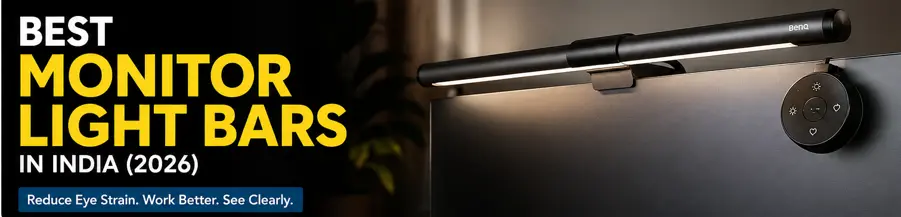
A good monitor light bar can improve desk lighting without taking up valuable workspace. It can illuminate your keyboard and work area while reducing the need for a separate desk lamp. In this guide, we compare some of the best monitor light bars available in India and explain which ones are worth considering for work, study, gaming, and long hours at your desk.
If you spend long hours in front of a computer, poor lighting can lead to eye strain, headaches, and fatigue. A monitor light bar is a simple accessory that mounts on top of your monitor and shines light directly onto your desk instead of your screen. This reduces glare, improves visibility, and creates a more comfortable workspace.
Whether you work from home, attend online classes, edit videos, or enjoy late-night gaming, a good monitor light bar can make your setup more comfortable and productive.
After comparing brightness, build quality, features, customer reviews, and value for money, here are the best monitor light bars available in India.
Best Monitor Light Bars Compared
| Product | Brightness | Color Temperature | Power | Verdict |
|---|---|---|---|---|
| BenQ ScreenBar Halo 2 | Auto Dimming | 2700K–6500K | USB-C | Best Premium |
| iFalarila WIAONE | Auto Dimming | Adjustable | USB | Best Budget |
| Quntis Monitor Light Bar Focus Dual-Control 41 cm | Auto + Stepless Dimming | 3000K–6500K | USB | Best Value |
| KACA 13-Inch Monitor Screen Light Bar | Stepless Dimming | 3 Modes | USB | Best for Students |
1. BenQ ScreenBar Halo 2
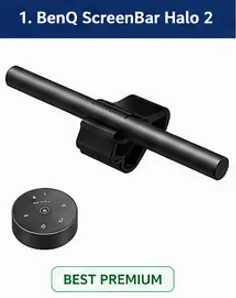
The BenQ ScreenBar Halo 2 is the premium choice in this list for users who spend long hours working at a monitor. It combines front lighting with rear backlighting, giving the desk and area behind the monitor more balanced illumination without taking up space on the desk.
Key Features
• 50 cm monitor light bar
• Front and rear lighting
• 2700K–6500K adjustable colour temperature
• Wireless controller with brightness and colour controls
• Real-time auto-dimming to the recommended 500 lux
• Ultrasonic motion sensor
• Compatible with flat and curved monitors
• USB-C power
• Glare-reducing asymmetric front lighting
• Rechargeable wireless controller
Pros
✔ Excellent lighting quality
✔ Front and rear lighting
✔ Wireless controller is very convenient
✔ Automatic brightness and motion detection
✔ Works with curved monitors
✔ Premium build quality
Cons
✘ Expensive compared with most monitor light bars
✘ Too expensive if you only need basic desk lighting
Best For
Professionals, programmers, gamers, content creators and anyone who spends several hours a day working at a monitor.
Why Buy It
The main reason to choose the Halo 2 is its combination of front lighting, rear backlighting and precise wireless control. The auto-dimming and motion-sensing features also make it more convenient for a desk that is used every day.
Why Skip It
Skip it if you only want an inexpensive light for occasional computer use. There are much cheaper options that can provide basic monitor lighting.
SmartBudgetGear Verdict
The BenQ ScreenBar Halo 2 is the best premium monitor light bar in this comparison. Its price is high, but the lighting control, rear illumination, curved-monitor compatibility and automatic features make sense for users who spend long hours at their desk.
Suggested Badge
🏆 Best Value: best premium monitor light bar
2. iFalarila Architect Desk Lamp
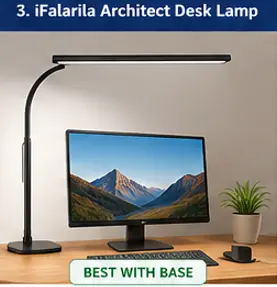
The iFalarila Architect Desk Lamp is a different approach to monitor lighting. Instead of mounting directly on the monitor, it uses a large adjustable lamp structure to provide broader illumination across the desk, making it more suitable for users who want to light a larger workspace for reading, writing or computer work.
Key Features
• Aluminium architect-style desk lamp
• Adjustable colour temperature
• Adjustable brightness
• Touch control
• Desktop mounting
• LED lighting
• Designed for office, reading and computer-work environments
• Broad lighting coverage compared with a compact monitor light bar
Pros
✔ Wide desk illumination
✔ Adjustable colour temperature
✔ Adjustable brightness
✔ Touch controls
✔ Useful for large workspaces
✔ More versatile than a monitor-only light
Cons
✘ Takes more desk space than a monitor light bar
✘ Not as minimalist as a screen-mounted light
✘ Does not provide the same monitor-mounted design as BenQ or Quntis
Best For
💼 Large office desks
📚 Reading and studying
💻 Computer work
🎨 Creative work
🏠 Home-office setups
Why Buy It
Choose the iFalarila if your priority is lighting the entire working area rather than only the space immediately below your monitor. Its adjustable arm and colour/brightness controls make it more flexible for reading, writing, and general desk work.
Why Skip It
Skip it if you specifically want a compact monitor-mounted light that leaves your desk completely clear. A dedicated monitor light bar is a better fit for that requirement.
SmartBudgetGear Verdict
The iFalarila Architect Desk Lamp is best viewed as a wide-coverage desk-lighting solution rather than a traditional monitor light bar. It makes sense for users with larger desks who want adjustable lighting for both computer work and other activities.
Suggested Badge
💰 Best for Large Desks: iFalarila Architect Desk Lamp
3. Quntis Monitor Light Bar with Auto-Dimming Function
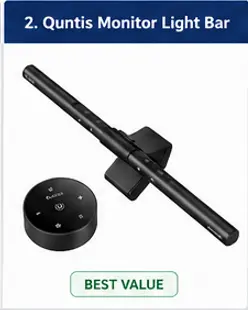
The Quntis Monitor Light Bar Focus is a practical option for users who want focused monitor and desk lighting without spending as much as a premium BenQ model. Its adjustable lighting and compact design make it suitable for work, study and everyday computer use.
Key Features
• Monitor-mounted light bar design
• Adjustable brightness
• Adjustable colour temperature
• Touch controls for convenient adjustment
• USB-powered operation
• Designed to illuminate the desk and keyboard area
• Space-saving alternative to a conventional desk lamp
Pros
✔ More affordable than premium models
✔ Compact and space-saving
✔ Adjustable brightness and colour temperature
✔ Suitable for work and study
✔ Simple to operate
Cons
✘ Fewer premium features than BenQ
✘ No sophisticated wireless control system
✘ Features depend on the exact Focus variant
Best For
💼 Office workers
🎓 Students
💻 Home-office users
⌨️ Programmers and writers
🌙 People who work at their computers at night
Why Buy It
The Quntis Focus makes sense if you want the basic benefits of a monitor light bar without paying premium-brand pricing. It provides adjustable desk lighting while keeping a traditional lamp off your limited desk space.
Why Skip It
Skip it if you want advanced automatic lighting, rear bias lighting or the more sophisticated controls available on premium models such as the BenQ ScreenBar Halo 2.
SmartBudgetGear Verdict
The Quntis Monitor Light Bar Focus is a good value choice for everyday desk lighting. It offers the essential features most users need while avoiding the premium price of high-end monitor light bars.
Suggested Badge
⭐ Best Value Quntis Monitor Light Bar Focus
4. KACA 13-Inch Monitor Screen Light Bar with Smart Touch Sensor
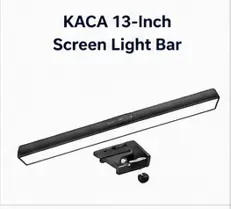
The KACA 13-Inch Monitor Screen Light Bar is a budget-friendly lighting accessory designed to improve workspace visibility while reducing eye strain during long hours of work, study, or gaming. Its 13-inch LED light bar features smart touch controls, three adjustable color temperature modes, stepless brightness dimming, and a convenient 60-minute auto-off timer. The clip-on design sits securely on top of most monitors, saving valuable desk space while providing glare-free illumination for your keyboard and work area.
Key Features
- 13-inch LED monitor light bar
- Smart touch sensor for easy operation
- Three color temperature modes (Warm, Neutral, and Cool White)
- Stepless brightness adjustment
- Built-in 60-minute auto-off timer
- USB-powered plug-and-play setup
- Space-saving clip-on design
- Flicker-free lighting for comfortable viewing
- Suitable for home, office, and study environments
Best For
- Students
- Office professionals
- Remote workers
- Programmers
- Home office users
- Budget-conscious buyers
Pros
- Affordable pricing
- Easy installation with USB power
- Adjustable brightness and color temperature
- Smart touch controls are simple to use
- Auto-off timer helps save energy
- Doesn’t occupy desk space
Cons
- No automatic ambient light sensor
- Build quality is more basic than premium models
- No wireless remote controller
- Not ideal for very thick or curved monitors
Why We Recommend It
The KACA 13-Inch Monitor Screen Light Bar is an excellent choice for buyers looking for an affordable monitor light bar with practical features. While it doesn’t include premium functions like auto-brightness or wireless controls, it delivers comfortable, glare-free lighting, multiple lighting modes, and stepless dimming at a budget-friendly price. It’s a great option for students, professionals, and anyone setting up a productive workspace without overspending.
A dependable entry-level monitor light bar that offers good lighting performance, simple controls, and excellent value for money for everyday computer use.
Suggested Badge
🎓 Best for Students
How to Choose the Best Monitor Light Bars
1. Brightness Adjustment
Choose a monitor light bar with multiple brightness levels so you can adjust it according to your room lighting.
2. Color Temperature
A range of 2700K to 6500K allows you to switch between warm light for evening work and cool white light for daytime productivity.
3. Anti-Glare Design
A good monitor light bar directs light toward the desk instead of the screen, reducing reflections and improving viewing comfort.
4. USB Power
Most monitor light bars are powered through USB, making them easy to use with laptops, desktops, or monitors that have USB ports.
5. Monitor Compatibility
Check whether the light bar is compatible with flat and curved monitors before buying.
6. Auto Dimming
Premium models automatically adjust brightness based on the ambient lighting in your room.
Benefits of Using a Monitor Light Bar
- Reduces eye strain during long work sessions.
- Minimizes glare on your monitor.
- Improves keyboard and desk visibility.
- Creates a clean and modern workspace.
- Saves desk space compared to traditional desk lamps.
- Provides consistent lighting for video calls and online meetings.
What to Check Before Buying
1. Monitor thickness
Check whether the mounting clip fits your monitor.
2. Curved monitor compatibility
Don’t assume a normal clip will work properly on a curved display.
3. Light distribution
The bar should illuminate the desk rather than throw distracting light onto the screen.
4. Brightness adjustment
Useful when moving between daytime and nighttime use.
5. Colour temperature
Warm light and cooler white light serve different preferences and working conditions.
6. Control method
Touch controls, wired controls, wireless dials and automatic sensors provide different levels of convenience.
7. Backlighting
A rear light can add ambient/bias lighting, but it also increases the price.
8. Power connection
Check whether it uses USB-A, USB-C or another power arrangement and whether your monitor can provide enough power.
How SmartBudgetGear Evaluates Products
We focus on the factors that matter before purchase, including the exact product model, stated specifications, compatibility, intended use, limitations, price range and availability.
Manufacturer specifications are treated as product information rather than independent test results. When a product has not been personally tested by SmartBudgetGear, we do not present our comments as hands-on experience.
Prices and availability can change, particularly on online marketplaces. Always check the current product listing and specifications before placing an order.
Our goal is to help readers understand whether a product fits their particular need rather than recommending a product simply because it is popular or inexpensive.
Final Verdict
If you want the best overall monitor light bar, the BenQ ScreenBar Halo 2 stands out for its automatic brightness adjustment, excellent build quality, glare-free lighting and premium features.
For most users, the Quntis Monitor Light Bar with Auto-Dimming offers the best balance of features, lighting performance and price.
If you’re on a tighter budget, the iFalarila Monitor Light Bar is a sensible choice for basic desk lighting, while the KACA 13-Inch Monitor Screen Light Bar is worth considering for students who want simple touch controls and an affordable setup.
Frequently Asked Questions
Q1. Are monitor light bars worth buying?
Yes. They provide focused desk lighting without creating glare on your monitor, making long working hours more comfortable.
Q2. Can I use a monitor light bar with a laptop?
Some models can be used with laptops, but they work best on desktop monitors with thicker top bezels.
Q3. Do monitor light bars consume a lot of electricity?
No. Most USB-powered monitor light bars consume only a few watts of power.
Q4. Which monitor light bar is best for office work?
The BenQ ScreenBar Halo 2 is the best premium choice for office professionals, while the Quntis Monitor Light Bar offers a better balance of features and price for most budget-conscious users.
Q5. Can a monitor light bar reduce eye strain?
Yes. While it cannot eliminate eye strain entirely, it reduces the contrast between a bright screen and a dark room, making viewing more comfortable.
Do Monitor Light Bars Actually Help?
A monitor light bar can make a desk setup more comfortable by adding focused light to the keyboard and work area without taking up desk space. Its usefulness depends on the light distribution, brightness, colour temperature, monitor compatibility, and whether it creates reflections on the display. A poorly designed or badly positioned light bar can still create unwanted glare.
Suggested Internal Links
Connect this article with your existing and upcoming SmartBudgetGear posts: