

This post may contain affiliate links. If you buy through them, I may earn a small commission at no extra cost to you.
The best webcam for Meetings can make your online meetings, virtual interviews, and video calls look more professional. In this guide, we’ve reviewed the best webcams for meetings in India (2026) to help you choose the right one.
Working from home has become a normal part of life. Whether you’re attending Zoom meetings, teaching online classes, interviewing for jobs, or speaking with clients, a good webcam can make a huge difference.
Laptop webcams are usually average, producing blurry video in low light. An external webcam offers sharper video, better microphones, improved colors, and a more professional appearance.
After comparing features, price, customer reviews, and reliability, here are the best webcams available in India.
Best Webcams for Meetings in India (2026): Quick Comparison
| Webcam | Resolution | Microphone | Rating | Best For |
|---|---|---|---|---|
| Logitech C270 HD | 720p | Mono | ⭐⭐⭐⭐☆ | Best Budget |
| Logitech C922 Pro | 1080p | Dual Stereo | ⭐⭐⭐⭐⭐ | Best Overall |
| Logitech Brio 300 | 1080p | Mono Noise Reduction | ⭐⭐⭐⭐☆ | Best Value |
| Dell WB3023 | 2K QHD | Noise Reduction | ⭐⭐⭐⭐⭐ | Premium Professionals |
| Lenovo 510 FHD | 1080p | Dual Stereo | ⭐⭐⭐⭐☆ | Office & Hybrid Work |
1. Logitech C270 HD Web Camera
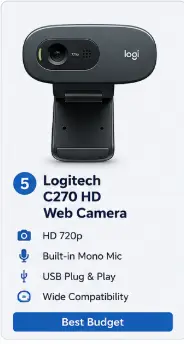
If you’re looking for an affordable webcam for online classes, occasional meetings, or video calls with family, the Logitech C270 remains one of the best budget webcams available.
Although it records in 720p HD instead of Full HD, it still offers dependable video quality, automatic light correction, and the trusted reliability that Logitech is known for.
Key Features
• HD 720p video.
•Built-in mono microphone for clear voice calls.
• Automatic light correction.
• Universal mounting clip.
• USB plug-and-play installation.
• Compact and lightweight design.
• Compatible with Windows, macOS, ChromeOS, Zoom, and Google Meet.
Pros
✔ Affordable price
✔ Trusted Logitech quality
✔ Easy setup
✔ Compact design
✔ Reliable microphone
✔ Good for basic video calls
Cons
✘ Only HD resolution
✘ No autofocus
✘ No privacy shutter
Best For
🎓 Students
🏠 Home users
👨💻 Beginners
💰 Budget-conscious buyers
📹 Occasional video calls
Why Buy It
• One of the most affordable branded webcams.
• Reliable performance for everyday meetings.
• Very easy to install.
• Compact enough to carry while traveling.
• Excellent value for first-time buyers.
Why Skip It
• You need Full HD video quality.
• You attend important client meetings regularly.
• You create YouTube videos or professional content.
SmartBudgetGear Verdict
The Logitech C270 proves that you don’t need to spend a lot to get a dependable webcam. While it lacks advanced features like Full HD recording and autofocus, it delivers reliable performance for online classes, casual meetings, and everyday communication. For budget buyers, it’s still one of the safest choices.
2. Logitech C922 Pro Stream Webcam
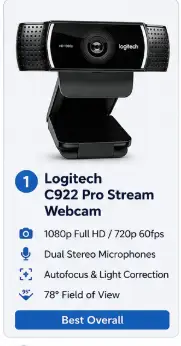
The Logitech C922 Pro Stream Webcam is an excellent choice for professionals, remote workers, online teachers, and content creators who want better video quality than a standard Full HD webcam. It delivers crisp 1080p video, fast autofocus, dual stereo microphones, and automatic light correction, making it suitable for Zoom, Google Meet, Microsoft Teams, streaming, and video recording.
Compared to entry-level webcams, the C922 offers smoother performance, improved low-light video, and reliable autofocus, making it one of the best premium Full HD webcams available in India.
Key Features
• Full HD 1080p video calling and recording at 30fps.
• HD 720p streaming at 60fps for smoother motion.
• Full HD glass lens with fast autofocus.
• Automatic HD light correction (RightLight 2).
• Dual built-in stereo microphones.
• 78° diagonal field of view.
• Universal monitor clip with tripod mounting support.
• USB plug-and-play connectivity.
• Compatible with Windows, macOS, ChromeOS, Zoom, Google Meet, Microsoft Teams, OBS Studio, and popular streaming software.
Pros
✔ Sharp Full HD 1080p video quality
✔ Fast and accurate autofocus
✔ Excellent low-light performance with RightLight 2
✔ Dual stereo microphones capture clear voice
✔ Supports 720p streaming at 60fps
✔ Compatible with all major meeting and streaming platforms
✔ Durable Logitech build quality
Cons
✘ USB-A connection instead of USB-C
✘ No built-in privacy shutter
✘ No HDR or 4K recording
✘ Premium price compared to entry-level webcams
Best For
💼 Office professionals
🏠 Remote workers
👨🏫 Online teachers
🎓 Students
🎥 Beginner YouTubers
🎮 Streamers
📹 Video conferencing
Why Buy It
• Excellent image quality for professional meetings and presentations.
• Fast autofocus keeps you sharp even if you move during calls.
• RightLight 2 improves video quality in dim lighting.
• Dual microphones provide clearer audio than most laptop webcams.
• Supports smooth 720p streaming at 60fps for live streaming.
• Proven Logitech reliability and long-term durability.
Why Skip It
• You need USB-C connectivity for newer laptops.
• You require 4K video recording.
• You want a built-in privacy shutter.
• You only need a basic webcam for occasional video calls.
SmartBudgetGear Verdict
The Logitech C922 Pro Stream Webcam is one of the best premium Full HD webcams available in India. Its sharp 1080p video, fast autofocus, RightLight 2 automatic light correction, dual stereo microphones, and support for 720p streaming at 60fps make it an excellent choice for professionals, remote workers, online educators, and beginner content creators. While it lacks USB-C connectivity, HDR, and a built-in privacy shutter, its consistent performance and dependable build quality make it a worthwhile investment for users who spend several hours each week on video calls or live streaming.
3. Logitech Brio 300
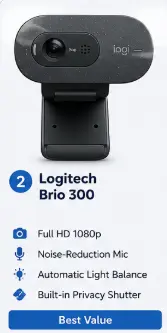
If you want a modern webcam with USB-C connectivity, stylish design, and improved privacy features, the Logitech Brio 300 is an excellent choice.
Designed primarily for hybrid workers and professionals, it delivers sharp Full HD video with natural colors for everyday business meetings and online classes while taking up very little desk space.
Key Features
• Full HD 1080p video at 30fps.
• Built-in privacy shutter.
• USB-C connectivity.
• Noise-reduction microphone.
• Auto Light Correction.
• Compact and lightweight design.
• Plug-and-play installation.
• Certified for Zoom, Microsoft Teams, and Google Meet.
Pros
✔ Sharp Full HD 1080p video quality
✔ USB-C connectivity for modern laptops
✔ Built-in privacy shutter for added security
✔ RightLight 2 automatically improves video in different lighting conditions
✔ Noise-reduction microphone delivers clearer voice calls
✔ Certified for Zoom, Microsoft Teams, and Google Meet
✔ Compact, lightweight, and easy to set up
Cons
✘ Fixed-focus lens (no autofocus)
✘ Mono microphone instead of dual microphones
✘ No HDR video support
✘ Not ideal for professional streaming or 4K recording
Best For
💼 Corporate professionals
🏠 Hybrid workers
🎓 College students
👨💼 Business meetings
🖥️ Home office users
Why Buy It
• USB-C works perfectly with modern laptops.
• Privacy shutter offers extra security.
• Attractive minimalist design.
• Reliable video quality for everyday meetings.
• Excellent option for hybrid work.
Why Skip It
• You need autofocus for recording videos or frequent movement during calls.
• You want HDR or 4K video quality.
• You need advanced camera controls and customization available on Logitech’s premium Brio webcams.
SmartBudgetGear Verdict
The Logitech Brio 300 delivers sharp Full HD video with natural colors for everyday business meetings and online classes. Its USB-C connectivity, RightLight 2 Auto Light Correction, built-in privacy shutter, and noise-reduction microphone make it a practical choice for professionals using modern laptops. While it lacks autofocus and advanced imaging features, it offers excellent value for hybrid work and daily video calls.
4. Dell 2K QHD Webcam WB3023
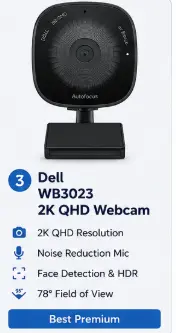
If you spend several hours every day in virtual meetings, client presentations, or video conferences, the Dell WB3023 2K QHD Webcam is a strong premium option for professional use in India. It combines 2K QHD resolution, HDR, autofocus, face detection, digital noise reduction, and a built-in privacy shutter to deliver a sharper and more polished video experience.
Compared with basic Full HD webcams, the WB3023 offers greater image detail and useful features such as 2× digital zoom and 65°/78° field-of-view options. It is particularly well suited to professionals who regularly rely on video calls and want better image quality without moving into much more expensive professional camera equipment.
Key Features
• 2K QHD video resolution delivers sharper and more detailed video than standard Full HD webcams.
• Sony image sensor helps deliver clear video for meetings, presentations, and video calls.
• HDR support improves detail and exposure in scenes with bright and darker areas.
• Autofocus keeps your face and other subjects sharp without manual adjustment.
• 65° and 78° field-of-view options let you choose a tighter or wider framing depending on your setup.
• 2× digital zoom allows you to bring the image closer when needed.
• Face detection helps the webcam recognize and prioritize faces during video calls.
• 2D and 3D digital noise reduction helps reduce visual and audio noise for cleaner communication.
• Built-in privacy shutter provides a simple way to cover the camera when it is not in use.
• USB-A connectivity provides straightforward plug-and-play connection with compatible computers.
• Compatible with popular video-conferencing platforms including Microsoft Teams, Zoom, Google Meet, and other USB webcam applications.
Pros
✔ Sharp 2K QHD video
✔ Sony image sensor
✔ HDR support
✔ Autofocus
✔ Face detection
✔ 2× digital zoom
✔ Built-in privacy shutter
✔ 65° and 78° viewing options
✔ Noise-reduction technology
Cons
✘ Premium pricing compared with basic Full HD webcams
✘ 2K resolution may be unnecessary for casual video calls
✘ USB-A connection is less convenient for laptops that have only USB-C ports
✘ Digital zoom cannot provide the same detail as optical zoom
Best For
💼 Business professionals
📊 Corporate meetings
🎥 Content creators
👨🏫 Online trainers
🏠 Work-from-home professionals
📹 Webinar hosts
Why Buy It
• 2K QHD resolution provides noticeably more detail than typical 720p and Full HD webcams.
• HDR and autofocus help maintain a cleaner and more balanced image in changing lighting conditions.
• Face detection and digital zoom provide useful controls for professional video calls and presentations.
• The 65° and 78° FOV options allow you to choose between a tighter personal frame and a wider view.
• Built-in privacy shutter is useful for professionals who regularly keep a webcam connected to their computer.
• Noise-reduction technology makes it a more capable option for frequent online meetings.
Why Skip It
• You mainly attend occasional video calls and don’t need 2K resolution.
• You’re looking for a webcam under a tight budget.
• Your laptop has only USB-C ports and you don’t want to use an adapter.
• A good Full HD webcam already meets your meeting and streaming requirements.
SmartBudgetGear Verdict
The Dell WB3023 2K QHD Webcam is a strong option for professionals who want better image quality than a basic Full HD webcam can provide. Its 2K resolution, Sony sensor, HDR, autofocus, face detection, noise reduction, and built-in privacy shutter make it well suited to frequent meetings, presentations, webinars, and remote work.
Its higher price means it isn’t the right choice for everyone. If you only make occasional video calls, a good Full HD webcam will offer better value. But for professionals who spend significant time on video calls and want sharper, more feature-rich video, the Dell WB3023 is a worthwhile upgrade.
5. Lenovo 510 FHD
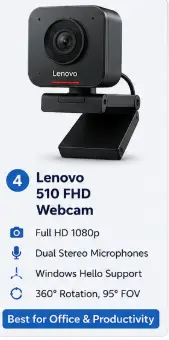
The Lenovo 510 FHD Webcam is a feature-rich webcam designed for professionals, remote workers, students, and hybrid office users. It combines Full HD 1080p video, dual stereo microphones, Windows Hello facial recognition, RGB clarity technology, and a wide 95° field of view to deliver a secure and professional video conferencing experience.
Its built-in Windows Hello support allows you to sign in to your Windows PC using facial recognition, while the 360° rotation and 4× digital zoom provide added flexibility during meetings and presentations.
Key Features
• Full HD 1080p video resolution for sharp and detailed video calls.
• Full stereo dual built-in microphones for clear voice communication.
• Built-in Windows Hello facial recognition for secure password-free login.
• RGB Clarity technology for improved color accuracy and image quality.
• Ultra-wide 95° viewing angle, suitable for individual and small group meetings.
• 4× digital zoom for flexible framing during presentations.
• 360° rotation with adjustable tilt for easy camera positioning.
• USB plug-and-play connectivity.
• Compatible with Windows, Zoom, Microsoft Teams, Google Meet, Skype, and other major video conferencing platforms.
Pros
✔ Sharp Full HD 1080p video quality
✔ Windows Hello facial recognition for secure login
✔ Dual stereo microphones provide clear audio
✔ Wide 95° field of view
✔ 360° rotation offers flexible positioning
✔ Easy plug-and-play installation
✔ Excellent choice for business meetings and remote work
Cons
✘ USB-A connection instead of USB-C
✘ Digital zoom reduces image quality at higher zoom levels
✘ No 4K video recording
✘ Premium price compared to basic Full HD webcams
Best For
💼 Office professionals
🏠 Remote workers
👨🏫 Online teachers
🎓 Students
💻 Hybrid office users
🔐 Users who want Windows Hello login support
Why Buy It
• Windows Hello support provides quick and secure sign-in without typing passwords.
• Wide-angle lens is ideal for presentations and small team meetings.
• Dual microphones capture voices clearly during online calls.
• Adjustable rotation and digital zoom make camera positioning more flexible.
• Reliable Lenovo build quality with easy setup.
Why Skip It
• You need USB-C connectivity for newer laptops.
• You require 4K recording or HDR video.
• You don’t need Windows Hello and only want a basic webcam.
SmartBudgetGear Verdict
The Lenovo 510 FHD Webcam stands out by combining Full HD video quality with productivity-focused features like Windows Hello facial recognition, dual stereo microphones, a 95° wide-angle lens, and flexible 360° rotation. While it doesn’t offer 4K recording or USB-C connectivity, it delivers excellent value for professionals, students, and remote workers who want a dependable webcam with added security and convenience.
Buying Guide
Before purchasing a webcam, consider these factors.
Resolution
720p is enough for basic meetings.
1080p is recommended for professionals.
2K or 4K is suitable for content creators.
Microphone
Choose webcams with dual microphones and noise cancellation if you don’t use an external microphone.
Auto Focus
Auto focus keeps your face sharp even when you move.
Low-Light Correction
If your room lighting isn’t ideal, choose webcams with automatic light correction.
Privacy Shutter
A physical shutter protects your privacy when the webcam is not in use.
Compatibility
Ensure the webcam supports:
• Zoom
• Google Meet
• Microsoft Teams
• Skype
• OBS Studio
• Windows
• macOS
🏆 SmartBudgetGear’s Top Recommendations
| Category | Product |
|---|---|
| 🏆 Best Overall | Logitech C922 Pro Stream Webcam |
| 💰 Best Value | Logitech Brio 300 |
| 💼 Best Premium | Dell WB3023 2K QHD Webcam |
| 🔐 Best for Office & Productivity | Lenovo 510 FHD Webcam |
| 💸 Best Budget | Logitech C270 HD Web Camera |
How SmartBudgetGear Evaluates Products
We focus on the factors that matter before purchase, including the exact product model, stated specifications, compatibility, intended use, limitations, price range and availability.
Manufacturer specifications are treated as product information rather than independent test results. When a product has not been personally tested by SmartBudgetGear, we do not present our comments as hands-on experience.
Prices and availability can change, particularly on online marketplaces. Always check the current product listing and specifications before placing an order.
Our goal is to help readers understand whether a product fits their particular need rather than recommending a product simply because it is popular or inexpensive.
Final Verdict
If you’re looking for the best overall webcam, the Logitech C922 Pro Stream Webcam is the clear winner. It offers Full HD video, autofocus, stereo microphones, automatic light correction, and reliable performance for meetings and video calls.
For buyers on a budget, the Logitech C270 is a dependable choice. If you want modern USB-C connectivity and a privacy shutter, the Logitech Brio 300 is a better fit. For professionals who want higher-resolution video, the Dell WB3023 is worth considering, while the Lenovo 510 is particularly useful for users who want Windows Hello and a wide field of view.
Frequently Asked Questions
Q1. Which webcam is best for Zoom meetings?
The Logitech C920 HD Pro remains one of the best choices because of its Full HD video, dual microphones, and reliable performance.
Q2. Is a 720p webcam enough?
Yes, for casual meetings. However, 1080p offers noticeably better image quality.
Q3. Do webcams have built-in microphones?
Most modern webcams include built-in microphones, but premium models provide much better sound quality.
Q4. Which webcam is best for work from home?
The Logitech Brio 300 and Logitech C920 are excellent choices for remote professionals.