

This post may contain affiliate links. If you buy through them, I may earn a small commission at no extra cost to you.

Choosing the Best USB Hubs for Laptops can be confusing because there are dozens of options available. Modern laptops are becoming thinner every year, but there is one big problem: fewer ports.
Many new laptops and MacBooks come with limited USB ports, making it difficult to connect a mouse, keyboard, external drive, memory card, monitor, or other accessories.
A good USB hub solves this problem by adding multiple connectivity options through a single port.
In this guide, we selected some of the best USB hubs for laptops in India based on features, usability, build quality, and value for money.
If you’re building a complete laptop workstation, don’t miss our guide on Best Wireless Mouse Under ₹1000 in India, where we’ve compared the top budget wireless mice for work, study, and everyday use.
Best USB Hubs for Laptops: Quick Comparison
Here’s our comparison of the Best USB Hubs for Laptops in India.
| USB Hub | Best For | Key Strength | Overall |
|---|---|---|---|
| ZEBRONICS CT101 10-in-1 | Maximum port variety | Ethernet + HDMI + SD + microSD + USB | 9.3/10 |
| UGREEN Revodok 105 | Everyday laptop use | 100W PD + HDMI + USB | 9.1/10 |
| Portronics Mport 52 | Card readers & value | 7-in-1 + SD + microSD | 9.2/10 |
| Anker 7-in-1 | 4K display users | 4K@60Hz + 85W charging | 9.2/10 |
| Amazon Basics 8-in-1 | Office/home setups | Ethernet + HDMI + card readers | 9.0/10 |
1. UGREEN Revodok 105 5-in-1 USB-C Hub – Best Overall for Everyday Laptop Connectivity
Why We Recommend It
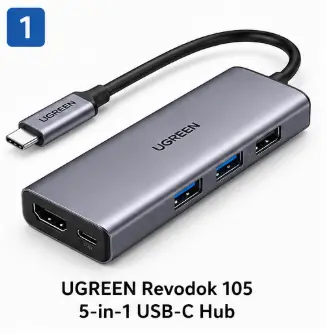
The UGREEN Revodok 105 is a compact 5-in-1 USB-C hub designed for laptop users who need HDMI, USB-A ports and pass-through charging without carrying a larger docking station.
What makes this particular model attractive is its straightforward port combination. You get 4K HDMI output, 100W USB-C Power Delivery, one USB-A 3.0 port with up to 5 Gbps transfer and two USB-A 2.0 ports. That makes it particularly useful for a laptop setup involving a monitor, external storage, mouse, keyboard and charging.
It is a better choice than a basic USB hub if you actually need display output and laptop charging. If you only need extra USB-A ports, however, you don’t need to spend money on a 5-in-1 USB-C hub.
Key Features
• 5-in-1 connectivity with HDMI, USB-C PD and three USB-A ports.
• 4K HDMI output at up to 30Hz for compatible external displays. Your laptop’s USB-C port must support video output.
• 100W USB-C Power Delivery pass-through for charging compatible laptops while the hub is connected.
• One USB-A 3.0 port with up to 5 Gbps for faster data transfers.
• Two USB-A 2.0 ports up to 480 Mbps, better suited to keyboards, mice and other lower-bandwidth peripherals.
Pros
✔ Useful combination of HDMI, USB-A and PD
✔ 100W pass-through charging
✔ 5 Gbps USB-A port for external storage
✔ Compact design
✔ Two additional USB-A ports for everyday peripherals
Cons
✘ HDMI is limited to 4K at 30Hz
✘ Two USB-A ports are only USB 2.0
✘ Full functionality depends on the USB-C capabilities of your laptop
✘ Not a replacement for a full desktop docking station
Best For
💻 Laptop and MacBook users
🖥️ Users connecting one external monitor
💼 Office professionals
🏠 Work-from-home setups
🎓 Students with multiple USB accessories
💾 Users who occasionally connect external storage
Why Buy It
• You need HDMI + USB-A + charging from one compact adapter.
• You want a reliable everyday hub rather than a large docking station.
• You use a monitor and several USB peripherals with your laptop.
• You want 100W PD pass-through charging.
Why Skip It
• You need 4K at 60Hz.
• You regularly transfer large files through multiple USB ports simultaneously.
• You need Ethernet, SD or microSD card readers.
• Your laptop’s USB-C port does not support video output or the required USB functions.
SmartBudgetGear Rating
| Category | Score |
|---|---|
| Connectivity | 9.2/10 |
| Port Selection | 9.1/10 |
| Build & Portability | 9.2/10 |
| Performance | 9.0/10 |
| Value for Money | 9.1/10 |
| Overall Rating | 9.1/10 |
SmartBudgetGear Verdict
The UGREEN Revodok 105 is the best balanced choice in this list for someone who wants the essential laptop-expansion features without moving to a bulky dock. Its 4K HDMI output, 100W PD and combination of USB 3.0 and USB 2.0 ports cover the needs of most everyday laptop setups.
It is not the most powerful hub here, but that is not the point. Its strength is the balance between size, useful ports and price.
For the SmartBudgetGear ranking layout, I would position this as:
🏆 Best Overall: UGREEN Revodok 105
2. Portronics Mport 52 7-in-1 USB-C Hub – Best Value for Card Readers and Everyday Expansion
Why We Recommend It
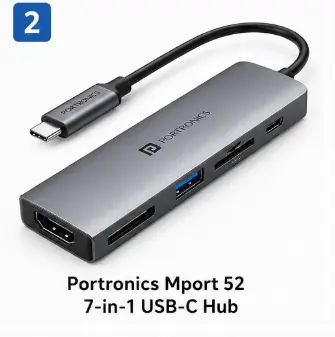
The Portronics Mport 52 is substantially more capable than the current article makes it sound. It is a 7-in-1 USB-C hub with 4K HDMI, USB 3.0, USB-C data/PD and dedicated SD and microSD card readers.
That makes it particularly interesting for photographers, content creators and laptop users who regularly move files from memory cards.
This is not simply a “multiple USB port” product. Its card-reader support is one of the main reasons to buy it.
Key Features
• 7-in-1 design for expanding a compatible USB-C laptop.
• 4K HDMI output up to 30Hz for compatible external displays.
• USB 3.0 port for faster file transfers.
• USB-C data and Power Delivery support.
• Dedicated SD and microSD card readers for memory-card transfers.
• Compact 70g aluminium-style body designed for portable use.
Pros
✔ 7-in-1 functionality
✔ SD and microSD card readers
✔ 4K HDMI
✔ USB-C data and PD
✔ Compact and lightweight
✔ Particularly useful for photographers and creators
Cons
✘ HDMI is limited to 30Hz at 4K
✘ Not a substitute for a full docking station
✘ Port performance depends on the laptop and connected devices
Best For
📷 Photographers
🎥 Content creators
💻 Laptop users
🎓 Students
💼 Office professionals
💾 Users transferring SD/microSD card files
Why Buy It
• You need card readers and HDMI in one compact hub.
• You regularly transfer photos or videos from SD/microSD cards.
• You want more than basic USB expansion without buying a full dock.
Why Skip It
• You don’t use SD or microSD cards.
• You need 4K at 60Hz.
• You need Ethernet.
• You need a large number of high-speed USB ports.
SmartBudgetGear Rating
| Category | Score |
|---|---|
| Connectivity | 9.3/10 |
| Port Selection | 9.3/10 |
| Portability | 9.2/10 |
| Features | 9.2/10 |
| Value for Money | 9.1/10 |
| Overall Rating | 9.2/10 |
SmartBudgetGear Verdict
The Portronics Mport 52 is arguably the most useful choice in this list for buyers who need SD/microSD card access alongside HDMI and USB connectivity. It gives you considerably more functionality than a basic USB hub without becoming a full-sized docking station.
For the SmartBudgetGear ranking layout, I would position this as:
🏆 Best Value for Card Readers: Portronics Mport 52
3. Anker USB-C Hub 7-in-1 – Best for 4K 60Hz Display Output
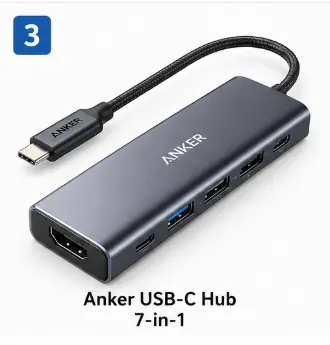
The important distinction is its 4K@60Hz HDMI output and up to 85W charging, according to Anker’s official product information.
Key Features
• 7-in-1 USB-C hub for expanding compatible laptops.
• 4K HDMI at 60Hz, making it better suited to smooth high-resolution display output than the UGREEN Revodok 105’s 4K@30Hz HDMI.
• Up to 85W charging through compatible USB-C Power Delivery setups.
• Includes USB ports and SD/TF card access for peripherals and memory cards.
• Compact design aimed at laptop and workstation use.
Pros
✔ 4K@60Hz HDMI
✔ Up to 85W charging
✔ 7-in-1 connectivity
✔ SD/TF card access
✔ Strong option for a premium laptop setup
✔ Compact design
Cons
✘ Costs more than basic hubs
✘ Not necessary for users who only need USB-A ports
✘ Actual performance depends on the host laptop and connected devices
Best For
🖥️ Users running 4K displays
💼 Professionals
🎥 Content creators
💻 MacBook users
🏠 Home-office setups
Why Buy It
• You specifically need 4K at 60Hz.
• You want a more capable display-oriented hub.
• You need card readers and additional USB connectivity.
• You are willing to pay more for a premium hub.
Why Skip It
• Your monitor is only Full HD.
• You don’t need HDMI.
• You only want two or three additional USB ports.
• Your priority is the lowest possible price.
SmartBudgetGear Rating
| Category | Score |
|---|---|
| Connectivity | 9.4/10 |
| Display Capability | 9.5/10 |
| Build Quality | 9.3/10 |
| Features | 9.3/10 |
| Value for Money | 8.7/10 |
| Overall Rating | 9.2/10 |
SmartBudgetGear Verdict
The Anker 7-in-1 is the better choice when display quality matters. Its 4K@60Hz HDMI support is the major reason to choose it over a cheaper 4K@30Hz hub.
It isn’t the best choice for every laptop user because the premium price is difficult to justify if you only need basic USB expansion.
For the SmartBudgetGear ranking layout, I would position this as:
🏆Best for 4K 60Hz: Anker 7-in-1
4. ZEBRONICS CT101 10-in-1 Multiport Hub – Best for Maximum Port Variety
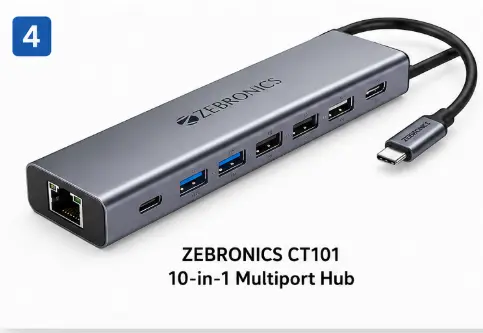
The exact CT101 is a 10-in-1 hub with 2 USB-C ports, USB 3.0, three USB 2.0 ports, SD, microSD, HDMI, RJ45 Ethernet and USB-C PD. Zebronics itself lists support for 100W PD, 4K@30Hz HDMI and up to 5 Gbps transfer.
Key Features
• 10-in-1 design with USB-C, USB-A, HDMI, SD, microSD and RJ45 Ethernet connectivity.
• 100W USB-C PD support for compatible charging setups.
• 4K@30Hz HDMI 1.4 output.
• Up to 5 Gbps transfer speed on supported USB connections.
• RJ45 Ethernet for wired networking.
• Metal body with LED indicator.
Pros
✔ 10-in-1 port selection
✔ Includes Ethernet
✔ Includes SD and microSD
✔ 100W PD support
✔ 4K HDMI
✔ 5 Gbps transfer support
Cons
✘ More ports don’t automatically mean better performance
✘ Several USB ports are USB 2.0
✘ 4K HDMI is limited to 30Hz
✘ Larger port selection may be unnecessary for simple users
Best For
💼 Desktop-style laptop setups
🌐 Users needing Ethernet
📷 Photographers
🎥 Content creators
🖥️ Multi-device workstations
🏠 Home offices
Why Buy It
• You need Ethernet + HDMI + card readers + USB ports in one device.
• You want the maximum number of connection types among these five products.
• You are building a more complete laptop workstation.
Why Skip It
• You only need one or two extra USB ports.
• You want 4K at 60Hz.
• Portability is your main priority.
SmartBudgetGear Rating
| Category | Score |
|---|---|
| Connectivity | 9.6/10 |
| Port Variety | 9.7/10 |
| Features | 9.3/10 |
| Build Quality | 8.8/10 |
| Value for Money | 9.0/10 |
| Overall Rating | 9.3/10 |
SmartBudgetGear Verdict
The ZEBRONICS CT101 is the most versatile hub in this comparison if your priority is the number and variety of ports. Ethernet, HDMI, SD, microSD, USB-A and USB-C are all available in one compact adapter.
It is not the best choice for everyone. If you don’t need Ethernet or memory-card readers, a smaller hub will be easier to carry and probably better value.
For the SmartBudgetGear ranking layout, I would position this as:
🏆 Best Port Variety: ZEBRONICS CT101
5. Amazon Basics 8-in-1 USB-C Hub – Best for a Simple Workstation Setup
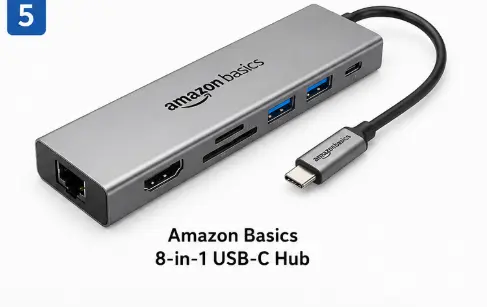
The product shown in your Amazon screenshot is an 8-in-1 USB-C hub with HDMI, Ethernet, USB connectivity, USB-C PD and SD/TF card-reader functionality. The available product documentation also identifies 4K HDMI and Ethernet as major features.
Key Features
• 8-in-1 USB-C connectivity for compatible laptops.
• 4K HDMI output up to 30Hz.
• RJ45 Ethernet for wired network connectivity.
• USB 3.0 connectivity for compatible high-speed peripherals.
• USB-C Power Delivery for pass-through charging.
• SD and TF/microSD card readers for transferring files from memory cards.
• Compact aluminium-style body suitable for desk and travel use.
Pros
✔ HDMI
✔ Ethernet
✔ SD and TF card readers
✔ USB-C PD
✔ USB 3.0 connectivity
✔ Useful all-round port selection
Cons
✘ 4K output is limited to 30Hz
✘ Not necessary for users who only need USB expansion
✘ Performance depends on the host laptop and connected peripherals
Best For
💼 Office professionals
🏠 Work-from-home users
📷 Photographers
🎓 Students
💻 Laptop users who need Ethernet
Why Buy It
• You want Ethernet and card readers in addition to ordinary USB ports.
• You need one compact hub for a home-office setup.
• You want a practical all-rounder rather than a gaming-focused hub.
Why Skip It
• You need 4K at 60Hz.
• You don’t need Ethernet or card readers.
• You only need basic USB expansion.
SmartBudgetGear Rating
| Category | Score |
|---|---|
| Connectivity | 9.2/10 |
| Port Variety | 9.2/10 |
| Ease of Use | 9.1/10 |
| Build & Portability | 8.9/10 |
| Value for Money | 8.8/10 |
| Overall Rating | 9.0/10 |
SmartBudgetGear Verdict
The Amazon Basics 8-in-1 USB-C Hub is a sensible all-rounder for users who need more than USB ports alone. Ethernet, HDMI, card readers and USB-C charging make it useful for office and home-workstation setups.
It doesn’t have the strongest reason to buy if your requirements are simple, but for someone who wants several common laptop connections in one compact adapter, it is a practical option.
For the SmartBudgetGear ranking layout, I would position this as:
🏆 Best All-Rounder: Amazon Basics 8-in-1
How to Choose the Best USB Hub for a Laptop?
Before buying, check these important points:
- Number of Ports
For basic use, 4 USB ports are enough. For professional work, choose hubs with HDMI, card reader, and Type-C support.
- USB Speed
USB 3.0 hubs provide faster transfer compared to USB 2.0.
- Build Quality
Aluminium body hubs usually last longer.
- Compatibility
Check compatibility with Windows, MacBook, Chromebook, and tablets.
Looking for more laptop accessories? Read our Best Laptop Accessories Under ₹1000 guide to discover budget-friendly gadgets that improve productivity and comfort.
Final Verdict
There isn’t one USB hub that is best for every laptop user. The right choice depends on the ports you actually need.
UGREEN Revodok 105 is the best balanced choice for everyday laptop connectivity, especially if you need HDMI, USB-A expansion and 100W pass-through charging.
Portronics Mport 52 makes more sense for users who regularly work with SD and microSD cards and want a compact 7-in-1 hub.
Anker 7-in-1 is the better choice when 4K at 60Hz matters and you are willing to pay more for a premium hub.
ZEBRONICS CT101 is the most versatile option for users who want Ethernet, HDMI, card readers and a wide range of USB ports in one adapter.
Amazon Basics 8-in-1 is a practical choice for office and home-workstation users who want Ethernet, HDMI, card readers and USB connectivity in one compact hub.
Before buying, check your laptop’s USB-C capabilities. A USB-C port does not automatically mean that it supports video output or Power Delivery. That compatibility point is more important than simply counting the number of ports.
FAQs
Q1. Which USB hub is best for laptops?
UGREEN, Anker, and Portronics USB hubs are popular choices depending on your budget.
Q2. Can USB hubs damage laptops?
Good-quality branded USB hubs are generally safe when used properly.
Q3. Is a USB-C hub better than a normal USB hub?
For newer laptops, USB-C hubs provide better connectivity options.