

This post may contain affiliate links. If you buy through them, I may earn a small commission at no extra cost to you.
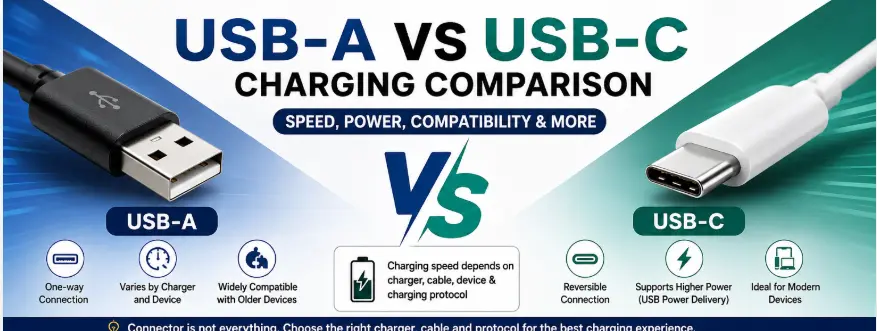
USB-A vs USB-C charging is an important comparison when choosing a charger or cable. However, the connector alone does not determine charging speed. The actual charging performance depends on the charger, cable, device, and charging protocol supported by all three.
In this USB-A vs USB-C charging comparison, we explain the differences in connector design, charging capability, compatibility and what actually determines charging speed.
USB-C is the newer reversible connector and can support higher power delivery capabilities, but not every USB-C charger or cable supports the same charging speed. USB-A is still useful for many older devices and accessories.
What is USB-A in USB-A vs USB-C Charging
USB-A is the traditional rectangular USB port used in older chargers, laptops, and power banks.
✔ Features
- Rectangular connector with one-way insertion
- Common on older chargers, computers, and power banks
- Can support different charging standards depending on the charger and device
- Charging performance varies by the specific USB implementation
USB-A remains common on older chargers and accessories, although USB-C is increasingly used on newer smartphones, laptops and charging equipment.
What is USB-C in USB-A vs USB-C Charging
USB-C is a modern, reversible connector used in smartphones, laptops, and fast chargers.
✔ Features
- Reversible connector that can be inserted either way
- Can support higher charging power depending on the supported charging protocol
- Can support different data speeds depending on the USB specification
- Used widely in modern smartphones, tablets, laptops and accessories
👉 Common in new devices.
The USB-A vs USB-C charging differences become clearer when we compare the connector design, compatibility and charging capabilities side by side.
USB-A vs USB-C (Quick Comparison)
| Feature | USB-A | USB-C |
|---|---|---|
| Connector design | Rectangular, one-way insertion | Smaller and reversible |
| Charging capability | Varies by charger and charging protocol | Can support higher power depending on device, charger and protocol |
| Fast charging | Possible with compatible technologies | Possible, including USB Power Delivery where supported |
| Data speed | Depends on USB version | Depends on USB version and implementation |
| Device compatibility | Common with older devices and accessories | Common with modern smartphones, tablets and laptops |
| Cable orientation | One-way | Reversible |
| Long-term adoption | Still widely used | Increasingly common in new devices |
USB-A vs USB-C Charging: Key Differences
1. Charging Speed
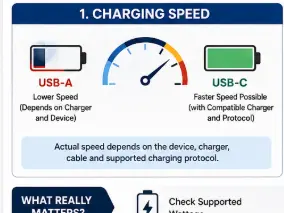
USB-C can support fast charging technologies such as USB Power Delivery, but the USB-C connector alone does not guarantee fast charging.
Actual charging speed depends on four things:
- The maximum power supported by your phone or other device
- The charging protocol supported by the charger
- The cable’s power capability
- Whether the charger, cable and device can communicate using a compatible charging standard
A USB-C charger may therefore charge slowly if the charger or device supports only lower power. Likewise, some USB-A chargers can provide faster charging through supported proprietary or other compatible charging technologies.
USB Power Delivery enables flexible higher-power charging over compatible USB-C implementations, with the latest specifications supporting power levels up to 240W in appropriate configurations.
2. Power Output
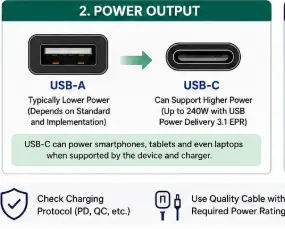
USB-C has the potential to support significantly higher power levels, especially when USB Power Delivery is implemented. Current USB Power Delivery specifications support up to 240W in compatible systems, cables and chargers.
However, this does not mean every USB-C charger can provide high power. Always check the charger’s rated output and the charging capability of your device.
USB-C can charge many laptops when both the laptop and charger support compatible USB-C power delivery.
3. Connector Design and Ease of Use
USB-C has a reversible connector, so you can insert the plug either way. USB-A has a fixed orientation, meaning the connector must be inserted in the correct direction.
4. Future Compatibility
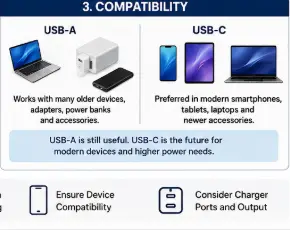
USB-C is becoming increasingly common on modern smartphones, tablets, laptops, and accessories. However, USB-A remains widely used and is still useful for older devices, accessories, and existing charging equipment.
If you are buying a new charger for modern devices, USB-C is generally the more flexible option. However, choosing USB-C does not automatically guarantee compatibility with every fast-charging standard.
What Matters More Than USB-A or USB-C?
When buying a charger, do not choose based only on the connector type.
Check:
• Maximum wattage: For example, 18W, 25W, 33W, 45W or higher
• Charging protocol: Such as USB Power Delivery or the protocol required by your device
• Cable capability: The cable must support the required charging power
• Device compatibility: Your phone or laptop determines how much power it can actually accept
• Number of ports: Multi-port chargers may share available power between connected devices
The best charger is not necessarily the one with the newest connector. It is the one that supports your device’s required charging standard and power level.
✅ Which One Should You Choose?
Choose USB-A if:
✔ You mainly use older devices or accessories
✔ Your existing cables use USB-A connectors
✔ You need a basic charging connection
✔ Your device does not require USB-C fast charging
Choose USB-C if:
✔ Your phone or laptop uses USB-C
✔ Your device supports USB-C charging
✔ You want compatibility with modern charging equipment
✔ Your device supports USB Power Delivery or another USB-C charging standard
✔ You are buying a charger for newer devices
My recommendation
For most people buying a new charger in 2026, USB-C is the better long-term choice for modern devices. However, check the wattage and charging protocol before buying because a USB-C port alone does not guarantee faster charging.
According to USB standards, USB-C Power Delivery enables faster and more efficient charging.
Real-Life Example
Suppose your smartphone supports 25W charging. Using a compatible 25W charger and suitable cable may allow the phone to charge faster than with a lower-power charger.
However, simply changing from a USB-A connector to a USB-C connector will not automatically increase charging speed. The charger, cable and phone must support a compatible charging method.
Common USB-A vs USB-C Charging Mistakes
Mistake 1: Assuming every USB-C charger is fast
A USB-C connector does not automatically mean high-speed charging. Check the wattage and supported charging protocols.
Mistake 2: Buying only based on charger wattage
A 65W charger will not necessarily make a 25W phone charge faster than its maximum supported charging rate.
Mistake 3: Ignoring the cable
The charging cable can affect the available charging capability. Use a cable suitable for the required power and charging standard.
Mistake 4: Confusing USB-C with USB Power Delivery
USB-C describes the connector system, while USB Power Delivery is a separate charging technology. A USB-C device may support USB PD, but this is not automatic.
This section adds genuine value that the current article is missing.
The USB-A vs USB-C charging decision should not be based on connector type alone, because the charger, cable, device and charging protocol all affect real-world charging performance.
✅ Conclusion
USB-C offers a more modern and reversible connector design and can support significantly higher power levels when used with compatible charging technologies such as USB Power Delivery. However, USB-C does not automatically mean faster charging.
For actual charging performance, check the device’s supported wattage, the charger’s output, the charging protocol, and the cable capability.
For most new smartphones and laptops, USB-C is generally the better choice. USB-A remains useful for older devices and accessories where compatibility is the priority.
FAQs
Q1. Is USB-C always faster than USB-A?
No. USB-C does not automatically mean faster charging. Charging speed depends on the device, charger, cable and supported charging protocol. USB-C can support higher power delivery capabilities, including USB Power Delivery, when implemented by compatible products.
Q2. Can USB-C charge a laptop?
Yes, many laptops can charge through USB-C. However, the laptop, charger and cable must support compatible USB-C charging, and the charger must provide sufficient power.
Q3. Is USB-A still useful?
Yes. USB-A is still widely used for older devices, accessories and chargers. It remains useful when you need compatibility with existing USB-A cables and equipment.
Q4. Does a USB-C cable always support fast charging?
No. USB-C cables can have different capabilities. Check whether the cable supports the charging power and protocol required by your device.
Q5. What should I check before buying a charger?
Check your device’s supported charging wattage, the required charging protocol, the charger’s output, and the cable’s capability. These factors matter more than connector shape alone.
👉 Also read: Best Fast Charging USB-C Cables Under ₹500 in India
👉 Also read: If you want faster charging, check our guide on Best Type-C Chargers Under ₹800 in India.